How Does OnlyFans Payment Work? I'll Explain

Hi, I'm Jill Hills. One of the biggest questions I get from new creators is, "How does OnlyFans payment actually work?" I remember feeling the same way, so let's break it down together.
At its heart, OnlyFans acts as a secure go-between. When a fan pays for my content, the platform handles the transaction, takes its 20% platform fee, and I keep the remaining 80%. My earnings then hang out in a pending balance for a bit before I can withdraw them.
Your Guide to OnlyFans Payments
Thinking about how money moves on OnlyFans can feel a little overwhelming at first, but it’s actually a pretty clear-cut system designed to protect both me and my subscribers. When I started out, I needed to see the entire financial journey—from a fan's credit card all the way to my bank account. Getting a handle on this flow is the key to managing your income like a pro.
The whole process unfolds in a few key stages. It all kicks off the moment a subscriber pays for something, whether it's a monthly subscription, a generous tip, or a pay-per-view (PPV) message.
OnlyFans takes care of all the tricky payment processing on the back end, and that's what their 20% cut covers. This fee pays for things like:
Payment Processing: Securely handling credit card transactions from fans anywhere in the world.
Content Hosting: Safely storing all of my videos, photos, and messages on their servers.
Creator Support: Giving me the tools and customer service I need to run my business.
This diagram shows the simple three-step journey of how a fan’s payment gets to me.
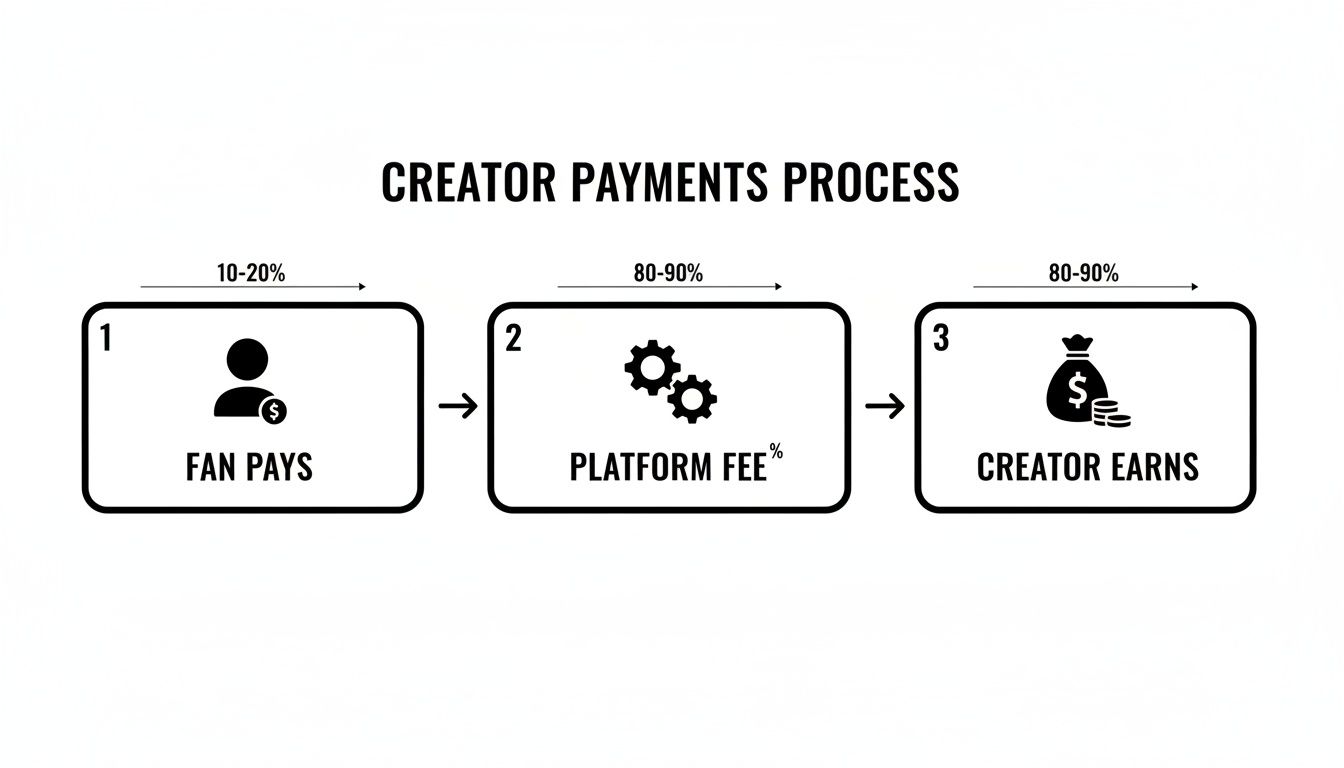
As you can see, the platform's main job is to make the money part easy so I can focus on what I do best—creating content.
To give you an even clearer picture, let's trace the journey of a single fan payment from start to finish.
The Journey of a Fan's Payment
Payment Stage | Who Is Involved | Key Action | What Happens to the Money |
|---|---|---|---|
1. The Purchase | Subscriber, OnlyFans | Fan pays for a subscription, tip, or PPV. | The fan's bank authorizes the charge, and the funds are sent to OnlyFans' payment processor. |
2. Processing & Fees | OnlyFans | The transaction is verified, and platform fees are deducted. | OnlyFans takes its 20% fee to cover operational costs. The remaining 80% is earmarked for the creator. |
3. Pending Period | OnlyFans, Creator | Your 80% cut is added to your "Pending Balance." | The funds are held for a standard clearing period (typically 7 days) to prevent fraud or chargebacks. |
4. Payout | Creator, Bank | You request a withdrawal once the funds are in your "Current Balance." | The money is transferred from OnlyFans to your chosen payout method, landing in your bank account. |
Once that platform fee is taken out, the remaining 80% is allocated directly to my earnings. For a deeper dive into the business side of things, I suggest checking out the secrets of an OnlyFans model in our related article.
Next up, I'll explore that 80/20 revenue split in more detail.
Understanding The 80/20 Revenue Split
Let's get right to the heart of how I make money on OnlyFans: the 80/20 revenue split. This isn't just some marketing slogan; it's the simple, powerful math behind every single dollar I earn on the platform.
No matter how a fan pays me—whether it's for their monthly subscription, a tip on a post, or unlocking that exclusive pay-per-view (PPV) message—the calculation is always the same. I get to keep 80% of whatever the fan paid. The other 20% goes to OnlyFans as their platform fee.

This straightforward model has become the gold standard in the creator world for good reason. It lets me focus on creating content and connecting with my audience, without having to decipher complicated fee structures or worry about hidden charges eating into my profits.
The Real-World Impact on Your Earnings
So, what does this 80/20 split actually look like in your bank account? Let me break it down with a quick, practical example from my own experience.
Let's say I've built a solid base of 100 subscribers who each pay $15 per month.
Here’s how the numbers play out:
Gross Monthly Revenue: 100 fans x $15/month = $1,500
OnlyFans' 20% Fee: $1,500 x 0.20 = $300
My Net Earning: $1,500 - $300 = $1,200
Just from subscriptions, I'm taking home $1,200. This kind of predictability is huge because it allows me to actually forecast my income and budget for the future. I know exactly what I’m earning from every transaction.
And remember, this isn't just for subscriptions. The 80/20 rule applies to every single revenue stream on my profile.
The beauty of this model is its simplicity and fairness. I do the creative work, build the community, and in return, I keep the vast majority of the revenue I generate. It puts the power squarely in my hands as the creator.
How The 80/20 Split Scales Your Income
The real magic happens when you start layering your income sources. Think about a creator with 500 subscribers paying $10/month. That's a $5,000 monthly gross from subscriptions alone.
Now, what if just 20% of those fans—that's 100 people—also buy an extra $50 worth of PPV content that month? Suddenly, their gross revenue shoots up to $10,000. After the platform's cut, they're left with a cool $8,000. You can find more creator earning statistics and see for yourself how successful creators stack these income streams.
This split covers all the primary ways I earn:
Monthly Subscriptions: My bread-and-butter recurring income.
Tips: Spontaneous payments from fans who love my work.
PPV Content: Exclusive photos and videos sent through messages.
Paid Messages: Charging a fee for one-on-one direct messaging.
Once I truly understood how my payment works with this split, I could start being strategic. I know that for every dollar I bring in, 80 cents is mine. That clarity makes setting goals, measuring my growth, and turning my content into a reliable business so much easier.
From Pending Balance to Payout: Following Your Money
I've made my first few sales, and I’m watching the numbers in my earnings dashboard climb. It's an incredible feeling! But then the big question hits: when does that digital figure actually land in my bank account?
Let me walk you through the journey my money takes, from the moment a fan pays to the day I cash out.
When a subscriber pays or a fan buys a piece of content, that money doesn't become available to me instantly. First, it goes into what OnlyFans calls my pending balance. I think of it as a brief, secure holding area.
This holding period is a standard security measure across platforms like this. It’s a buffer that protects everyone—me, the platform, and even the fan—from potential headaches like fraudulent payments or chargebacks (when a fan disputes a charge with their credit card company).
Why the Wait?
At first, this delay can feel a little frustrating, but it’s crucial for keeping the financial system stable and trustworthy. This brief hold simply confirms that the fan's payment is legitimate and has cleared their bank successfully. It’s a safety net ensuring the money I've earned is truly mine before I can withdraw it.
For brand-new creators, this pending period usually lasts about seven days. It’s a bit like a probationary period while the system gets to know you and your transaction patterns. As you build a solid history of legitimate earnings, this timeline can often get shorter.
The pending balance isn't a penalty; it's a protection mechanism. It ensures that by the time money is available for payout, it has been fully vetted, minimizing the risk of a chargeback clawing back my hard-earned income.
This system is a core part of a massive, but surprisingly smooth, payment process. While fans are charged instantly, the funds are held briefly before being cleared for creators. To give you an idea of the scale, this process handled an incredible $7.2 billion in fan spending in fiscal year 2024. Creators received their 80% cut, which came out to roughly $5.76 billion. You can find more details about creator earnings on CreatorHero.com.
From Pending to Payable
Once the holding period is over, my funds get a promotion. They move from my pending balance to my current balance. This is the money that's officially mine and ready to be withdrawn.
There's just one small hurdle left. I need to meet the minimum payout threshold, which for most regions is $20. I won't be able to request a withdrawal until my current balance hits at least that amount. It’s a pretty low bar, which is great for new creators wanting to get their first payment quickly.
After I’ve crossed that threshold, I’m in the driver's seat.
Setting Your Payout Schedule
OnlyFans gives me a lot of flexibility in how I actually get paid. I can choose a schedule that fits my own financial rhythm. My main options include:
Manual Payout: I log in and request a withdrawal whenever I want, as long as I’ve met the minimum.
Automatic Payout: I can set it and forget it with scheduled withdrawals. * Daily: Perfect for creators who want immediate access to their funds. * Weekly: A popular choice that provides a steady, predictable income stream. * Monthly: Great for those who prefer to treat their OnlyFans income like a traditional monthly paycheck.
Choosing the right schedule is all about what makes me feel most in control of my business. When I was starting out, I set my payouts to weekly just to get a feel for my income consistency. From there, I adjusted. It’s all about finding a rhythm that works for you.
Setting Up Your Bank Account for Payouts
Okay, I’ve covered how your money goes from "pending" to "payable." Now for the best part: actually getting that cash into your bank account. To make that happen, you have to connect a verified payout method to your OnlyFans profile. This step is absolutely mandatory, and I’ll walk you through how to get it done without any fuss.
I think of it like building the final bridge between my OnlyFans business and my personal finances. It’s the critical link that turns my hard work into actual, spendable income. OnlyFans needs to confirm I am who I say I am, which is non-negotiable for both security and legal reasons.
This whole verification process is my official entry into the creator payment system. It's a one-time setup, and once it's done, I'm clear for all future payouts.
Choosing Your Payout Method
First things first, you need to decide how you want to get paid. The options you see will depend on your country, but they generally fall into a few main categories. Each has its own pros and cons, so let me break down the most common ones.
Direct Bank Transfer (ACH): If you're in the United States, this is almost always the easiest and most popular route. ACH (Automated Clearing House) is a fancy term for a standard bank transfer that moves money right into your checking account. It's reliable and usually has low or no fees, but plan on it taking 2-5 business days to show up.
International Bank Transfer (SWIFT): For creators outside the US, you’ll most likely be using the SWIFT network. This is the global system for international wires. While it’s incredibly secure, SWIFT transfers can be slower and sometimes get hit with fees from intermediary banks, which come out of your payout.
eWallets and Other Services: In some regions, OnlyFans partners with digital payment platforms. These can be a lot faster—sometimes landing in your account within a day—but they might charge slightly higher transaction fees for the convenience.
When I was starting out, I just went with a direct bank transfer because it was cheap and reliable. The trick is to weigh what matters most to you: speed, cost, or convenience in your location.
Demystifying the Verification Process
After you've picked a payout method, it's time to tackle the identity verification. This is the single most important part of getting your payments set up, as it's required by law to stop fraud and keep things financially transparent. Don't let it intimidate you; if you have your documents ready, it’s a quick process.
I think of verification as my business's official registration. It's the step that legitimizes my account and proves to the platform I'm a real person ready to earn. This is essential for keeping the financial environment safe for everyone.
You'll need to upload clear, readable copies of a few key documents. The platform uses this info to confirm your identity and get everything ready for tax reporting.
Here’s a quick checklist of what to have on hand:
Government-Issued Photo ID: This can be your driver's license, passport, or a national ID card. The name on this ID must be an exact match for the name on your OnlyFans account and your bank account.
A Selfie with Your ID: You’ll have to snap a picture of yourself holding that ID. It’s a common security step to prove you physically have the document.
Tax Information: For creators in the US, this means filling out a W-9 form right on the site. This is where you provide your Social Security Number (SSN) or an Employer Identification Number (EIN) so OnlyFans can report your earnings to the IRS.
My biggest piece of advice here is to triple-check everything. One little typo in your name or address can jam up the whole process. Make sure your photos are clear, well-lit, and not blurry. Nailing this on the first try means you'll get approved faster and can request that first exciting payout without any frustrating back-and-forth.
Dealing With the Inevitable: Common Payment Problems
Sooner or later, you're going to run into a payment issue. It’s just the nature of online business. But don’t panic—most of these financial hiccups are minor and easy to sort out once you know what you’re looking at. I think of this as my financial first-aid kit for keeping my income flowing smoothly.
I’ll cover everything from a fan’s card getting declined to a problem with my own payout. Let's start with the most common one you'll see: a subscriber's payment failing.
When a Fan’s Payment Fails
You’ll get a notification when a subscriber's payment doesn't go through. My first piece of advice? Don't sweat it. Nine times out of ten, it’s a simple banking issue on their end that has nothing to do with you.
Here are the usual suspects:
Insufficient Funds: This is the big one. They just didn't have enough money in the account to cover the charge.
Expired Card: Their card on file has simply expired. Happens to all of us.
Bank Blocks: Sometimes a bank will flag an OnlyFans transaction as unusual, especially for a new user, and block it for fraud protection.
When this happens, OnlyFans automatically cuts off their access to my content. They can't see my feed or send me messages until they fix their payment info and the charge goes through successfully. The best part? I don't have to do a thing. The system handles it all.
Understanding and Handling Chargebacks
Okay, now for something a bit more serious: the dreaded chargeback. This isn't just a failed payment; it's when a fan goes directly to their bank or credit card company to dispute a charge, often claiming it was fraudulent. The money might have already been processed and sitting in my pending balance, which is what makes this so frustrating.
The bank immediately yanks the funds back while they "investigate." It can feel incredibly unfair, especially when I know I provided the content they paid for.
A chargeback isn't a refund. It's a forced reversal triggered by the fan's bank. The good news is that OnlyFans has a team dedicated to fighting bogus chargebacks for you, using things like transaction data and IP logs to prove the purchase was legit.
OnlyFans' security team will review the dispute. If it looks like "friendly fraud"—where someone buys and consumes content, then pretends they didn't authorize it—they'll fight it. The final call, however, is always up to the fan’s bank. If I lose the dispute, the money goes back to the fan, and I'll see it deducted from my earnings.
What to Do If Your Payout Fails
Sometimes the problem isn't on the fan's side—it's with my own withdrawal. Getting a "payout failed" email can definitely send a jolt of anxiety through you, but again, the solution is usually simple.
From my experience, it's almost always one of these three things:
Incorrect Bank Details: A single typo in my account number or SWIFT/BIC code is the number one culprit. I go back and check every single digit I entered into my payout settings.
Name Mismatch: The name on my OnlyFans profile must be an exact match to the name on my bank account. No nicknames, no missing middle initials. Any tiny difference can trigger a rejection.
Bank Rejection: In rare cases, a bank might just not accept payments from OnlyFans' international processors. It's worth a quick call to your bank to make sure they're good with receiving these kinds of transfers.
If a payout does fail, the money simply bounces back to my OnlyFans current balance. I can then fix my details and try requesting it again. Seriously, I always start by triple-checking my banking info. That alone solves the problem 99% of the time.
Your Financial Responsibilities With Taxes And Reporting
Making money on OnlyFans is a fantastic achievement, but it also means I’ve officially become a business owner. That title comes with some serious financial duties, especially when tax season rolls around. Let's get one thing straight right away: I am not a tax professional, and this is not financial advice. My goal here is to give you a basic roadmap to help you handle your money responsibly and avoid any unwelcome surprises from the taxman.
Once I started earning, I wasn't just getting a paycheck anymore—I was generating business income. This is a crucial mental shift. For creators in the United States, this makes me an independent contractor in the eyes of the government.
Because of this status, OnlyFans will send me a Form 1099-NEC as soon as I earn more than $600 in a year. This document reports my total gross earnings to both me and the IRS. It's vital to remember that this income isn't pre-taxed like a typical W-2 job. I am entirely responsible for figuring out and paying my own income and self-employment taxes.
Tracking Income and Expenses Is Key
Here's the good news: I only pay taxes on my profit, not my total revenue. My profit is simply my income minus all my legitimate business expenses. This is why becoming a meticulous record-keeper is my new superpower.
Every dollar I spend to run my OnlyFans business is a potential tax deduction. These are costs considered "ordinary and necessary" for my work, and they can dramatically lower the amount of income I'll owe taxes on. Keeping detailed records—receipts, bank statements, or a simple spreadsheet—is absolutely essential.
Understanding my financial responsibilities is a huge part of being a professional creator. It transforms my content creation from a hobby into a sustainable business and is a crucial part of knowing how OnlyFans payment works beyond just the platform itself.
Common Deductible Expenses for Creators
So, what can you actually write off? You should always run things by a qualified tax professional, but many creators successfully deduct expenses that are directly tied to producing their content.
Here are some of the most common examples of potential business expenses I've encountered:
Equipment: Think cameras, ring lights, laptops, and the phone I use to shoot and engage with fans.
Outfits and Props: Any clothing, lingerie, toys, or props I buy specifically for my photoshoots and videos.
Marketing and Promotion: The money I spend on advertising, paying for shoutouts, or other promotional campaigns to grow my page.
Home Office Deduction: If I have a dedicated space in my home used exclusively for my business, I can often deduct a portion of my rent or mortgage, utilities, and internet bill.
Professional Services: Fees I pay to accountants, lawyers, or virtual assistants who help me manage my business operations.
Tracking these expenses carefully is truly empowering. It gives me a clear, accurate picture of my business's financial health and ensures I aren't paying a penny more in taxes than legally required. For more on how creators are building their careers, check out our article on how OnlyFans is empowering women.
Common Questions About Getting Paid on OnlyFans
Let’s wrap up by hitting some of the most common questions I hear from creators about how the money side of OnlyFans actually works. Consider this your quick-hit guide for getting the clear answers you need.
How Often Can I Cash Out My Earnings?
You have total control here. Once you've earned enough to meet the $20 minimum payout, you can decide how often you want your money sent to you. OnlyFans lets you set up automatic payouts on a schedule that fits your life.
Your options for automatic payouts are:
Daily: Perfect if you like seeing your money hit your account as soon as it's available.
Weekly: A great choice for a consistent, predictable flow of income each week.
Monthly: This works well if you prefer to manage your earnings like a traditional monthly salary.
If I don't want to stick to a schedule, I can always do a manual payout. I just log in and request a withdrawal anytime my available balance is over the minimum.
Are There Any Sneaky Hidden Fees?
This is a big one, and thankfully, the answer is no. OnlyFans is very transparent about its 80/20 split. You keep 80%, they take 20%. That's it. There are no surprise platform fees deducted from your earnings.
Just keep in mind, you might see small fees from outside sources. Depending on where you live and which payout method you use, your bank or a third-party payment service might charge a standard transaction or wire transfer fee. These aren't from OnlyFans—they're just part of the banking system.
What Happens When a Subscriber's Payment Fails?
The system handles this automatically, which is a huge relief. If a subscriber's monthly payment gets declined, their access to my content is cut off immediately. They can’t see my feed or open any of my messages until they fix it.
OnlyFans notifies them that their payment method needs updating. As soon as they enter a valid card and the charge goes through, their access is restored just as quickly. I won't see that money in my pending balance until the payment is successful.
The platform’s automated system is your gatekeeper. It ensures only paying subscribers have access, so I never have to waste time chasing people down or manually blocking anyone whose payment didn't go through.
For a fascinating look at what it takes to build a real business on the platform, check out this story about a former teacher who became a top OnlyFans model.
Do I Really Have to Pay Taxes on My OnlyFans Income?
Yes, 100%. Every dollar you earn on OnlyFans is taxable income. When you're a creator, you're essentially running your own business and are classified as an independent contractor.
That means I am solely responsible for tracking my income, reporting it to the government, and paying all applicable taxes based on my local and federal laws. I always tell new creators to get into the habit of setting aside a portion of every payout for taxes. Seriously, talk to a tax professional—it will save you a world of headaches later on.
At Circle City News™, we provide candid, unapologetic coverage of the intersections of sex, culture, and local news. For more insights and stories that matter, visit us at https://circlecitynews.org.

Comments